All sheets / Avery® 5366
Avery® 5366 label template — File folder labels
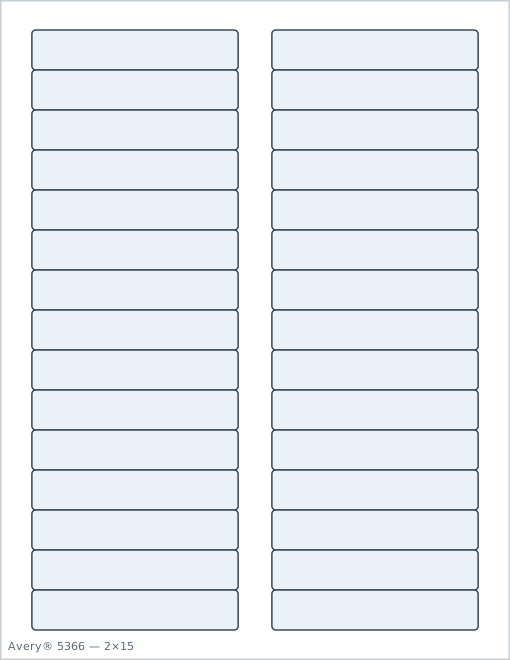
Each label is 3 7⁄16" × ⅔" (87.3mm × 16.9mm), arranged 2 × 15 for 30 labels per sheet on a US Letter page. Paste your text below and download a PDF positioned to land exactly inside the die-cut labels on a sheet compatible with Avery® 5366.
Also fits sheets sold under part numbers: 5066, 5166, 5266, 5268, 5368, 5378, 5666, 5766, 5866, 5966, 6368, 6466, 6468, 6500, 6505, 6865, 8066, 8166, 8366, 8478.
Looking for a different number? See the full Avery label size chart.
Have a spreadsheet? Import a CSV or Excel file →
If your printer is slightly off, nudge the whole grid. Saved per sheet.
Print at 100% scale — make sure "Fit to page" is turned off, or the positions won't line up.
Sheet 5366 specs
- Label size
- 3 7⁄16" × ⅔" (87.3mm × 16.9mm)
- Layout
- 2 columns × 15 rows
- Per sheet
- 30 labels
- Page size
- US Letter (8.5" × 11")
How many sheets do I need?
| Labels needed | Sheets of 5366 |
|---|---|
| 50 | 2 |
| 100 | 4 |
| 250 | 9 |
| 500 | 17 |
| 1000 | 34 |
Avery® 5366 template measurements
These are the exact positions the generator uses for 5366, measured from the edges of an 8.5" × 11" US Letter page. They are also the values Microsoft Word, LibreOffice, and Google Docs label add-ons ask for when you build a custom label template by hand.
| Top margin | 0.5" (12.7mm) |
|---|---|
| Bottom margin | 0.5" (12.7mm) |
| Left (side) margin | 0.531" (13.5mm) |
| Right margin | 0.531" (13.5mm) |
| Label width | 3.438" (87.3mm) |
| Label height | 0.667" (16.9mm) |
| Horizontal pitch | 4" (101.6mm) |
| Gap between columns | 0.563" (14.3mm) |
| Vertical pitch | 0.667" (16.9mm) |
| Gap between rows | 0" (0.0mm) |
| Number across × down | 2 × 15 |
| Safe text inset | 0.063" (1.6mm) |
How to print on Avery® 5366 sheets
- Type or paste your text into the generator above. Use one line per label for a list of names or addresses, or the same text on every label for return addresses and product stickers.
- Check the live preview. Text is kept at least 0.063" (1.6mm) inside each label edge, and auto-size shrinks long lines so they fit the 3 7⁄16" × ⅔" label.
- Download the PDF and open it in any PDF viewer. Print at 100% / Actual size with "Fit to page" turned off, because any scaling shifts every label out of position.
- Print one test page on plain paper, lay it over a 5366 sheet, and hold both up to a light. If the text sits inside the die-cut outlines, load the label sheets and print the full run.
- Partly used sheet? Set "Start at label" to the first empty position (1 to 30, counted left to right, top to bottom) so the used labels are skipped.
Using Avery 5366 file folder labels
Avery 5366 file folder labels are sized for standard 1/3-cut tabs — the tab width most letter-size hanging and manila folders use. Each label is 3-7/16" long by 2/3" tall, cut to wrap over the top edge of the tab and read from both the front and back once folded down, so the folder name is visible no matter which way it faces in the drawer.
That sizing assumes a letter-size folder tab. Legal-size folders (built for 8.5" × 14" pages) are often cut with a wider tab, so measure an actual tab from your box before printing a full run — a label that's too long for the tab will overhang and curl at the edges, and one that's too short leaves part of the tab exposed. Most legal folders list their tab width on the box the same way the labels do, so it's worth a 30-second check first.
The two-column, fifteen-row layout on a US Letter sheet gives you 30 labels per print run — enough for a full drawer of folders in one pass. Because file folder labels get read edge-on while flipping through a drawer rather than head-on, keep folder names short and put the most identifying word first — client surname, project code, or year — rather than a full sentence. Label Merge's auto-size mode will shrink a long name to fit the label automatically, but a short, front-loaded label is still easier to scan at a glance than a small one.
5366 shares its exact geometry with 5266, 5166, 8166, 8366, and the other part numbers listed above — if your box says one of those instead, this generator still lines up correctly.
Avery 5366 questions
Does Avery 5366 fit legal-size file folders?+
Not reliably. 5366 is cut for standard letter-size, 1/3-cut tabs — legal folders are often cut with a wider tab. Measure an actual tab before printing a full run, or check the folder packaging for its tab width.
Which way does the 5366 label wrap around the tab?+
It wraps over the top edge of the tab, so it's visible whether you're looking at the folder from the front or the back — that's why the label is designed to read correctly from both sides once folded down.
How many folders can I label from one sheet of 5366?+
30 — the sheet is laid out 2 columns × 15 rows.
Is 5366 the same as 5266 or 8166?+
Yes, all three share the identical 3-7/16" × 2/3" geometry. Avery sells the same physical layout under several numbers depending on finish and printer type; this generator works for any of them.
What are the page margins for Avery® 5366 labels?+
On a US Letter page, the first 5366 label starts 0.5" (12.7mm) from the top edge and 0.531" (13.5mm) from the left edge. The last row ends 0.5" (12.7mm) above the bottom edge, and the last column ends 0.531" (13.5mm) from the right edge.
Why is my Avery® 5366 printout misaligned?+
Almost always because the PDF was scaled. Print at 100% / "Actual size" with "Fit to page" or "Shrink oversized pages" turned off. Test on a plain sheet first, hold it against a 5366 sheet up to a light, and check that each text block sits inside a label with about 0.063" (1.6mm) of clearance.
Can I make an Avery® 5366 template in Microsoft Word instead?+
Yes — in Word's Label Options, choose New Label and enter a label width of 3.438" (87.3mm), height of 0.667" (16.9mm), top margin of 0.5" (12.7mm), side margin of 0.531" (13.5mm), horizontal pitch of 4" (101.6mm), vertical pitch of 0.667" (16.9mm), 2 across and 15 down. Or skip the setup and use the generator above, which already uses these numbers.